Is a 4K TV (or projector) enough, or is it better to go for 8K?
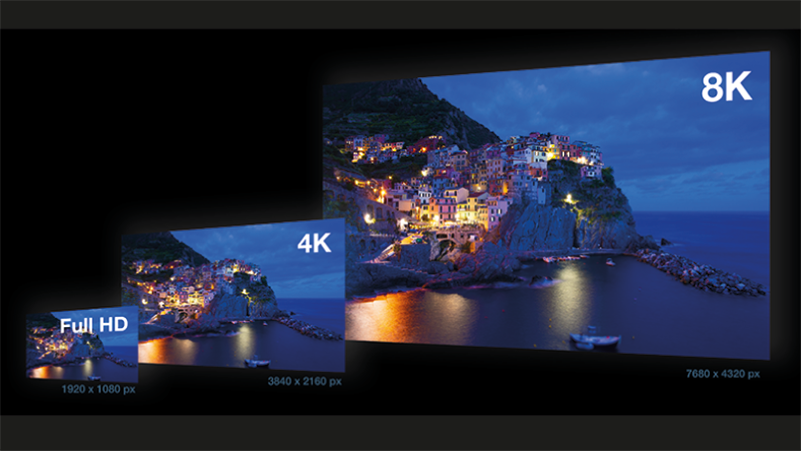
You can still buy Full HD TVs and projectors today, but the sharply reduced market supply leaves no doubt that these are being phased out. 4K is the norm today, but in the meantime, more and more 8K TVs and projectors are entering the market. And so the question is: is 4K enough or is 8K the better choice?
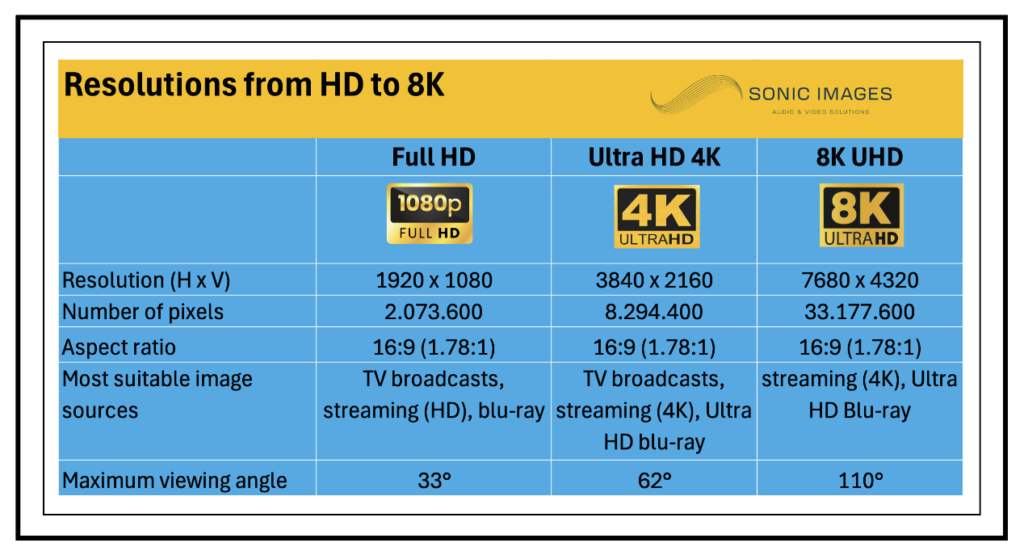
A Full HD TV (or projector) has a resolution of 1920 (W) x 1080 (H) pixels, about 2 million of them. 4K goes smoothly over that with a resolution of 3840 (W) x 2160 (H) – good for 8.3 million pixels. 8K does considerably better still, counting 7680 (W) x 4320 (H) pixels, or 33 million (!) pixels in total.
So in technical terms, a 4K projector or TV is superior to a Full HD device, while an 8K device is in turn better than a 4K device. But the question, of course, is how one and the other plays out in practice….
Objective
What you ultimately want is for the picture to be nice and sharp and for you to see all the details present in the content – a film, a series, a video game or even a news broadcast.
To get that done, you need to consider three things: the resolution of your TV or projector (as well as that of your streaming subscription or your Blu-ray player), the quality of the source material and the desired viewing angle.
Source material resolution
To begin with, we need to define what exactly that is, ‘source material’. Because in the majority of cases, the resolution as captured by a camera – digital or pelicule – is not the same as the resolution of the carrier – streaming or disc-based media – that you get to see in your home cinema or living room.
Let’s look at The Lord of the Rings trilogy as an example. That was shot on 35 mm film – that is, not digital – supplemented by computer-generated imagery (CGI). Once the film was edited, the pelicule was scanned in 2K resolution (2560 x 1440 pixels). Based on that scan, the digital file was created for cinema, as well as the DVD and Blu-ray versions. You didn’t get to see the 2560 x 1440-pixel resolution at all if you watched the DVDs at home, because at a resolution of 720 x 576 they already stop. On blu-ray, the situation is considerably better, because that still leaves 1920 x 1080 pixels of the scanned 2560 x 1440 resolution.
Quite a while later, the films also appeared on 4K blu-ray. To this end, a new scan was made of the original film pic, this time at 4K resolution. In the process, the CGI shots were also upgraded so that they would not look out of place with the other images in terms of resolution. So if you want to watch the LOTR trilogy in the best quality available, you’ll need a 4K Blu-ray player and a 4K or 8K screen.
Series and TV programmes are, for the most part, recorded and broadcast in HD. Streaming providers may want you to get a 4K subscription, but even in that case, most of what you watch will still be recorded in HD quality. That HD content may then be upscaled to 4K, but that’s still really not the same as true 4K.
The viewing angle
Depending on the viewing angle you want – the part of your field of view that is filled with images – you need a certain minimum resolution. If you stay below that, you will see individual pixels – and thus a blurred image – In this blog article, we explain from a to z which viewing angle is best to maintain.
Important to know is that in almost all cases – so for the most common viewing angles – HD does not suffice. 4K does suffice, and 8K obviously as well. The remarkable thing here is that, if you take into account the usual viewing angles – even if you choose them very generously – 8K offers no visible improvement over 4K. In other words, that improvement is there – especially provided you would have 8K source material – but the quality of our eyes is usually not good enough to perceive that improvement. So it is humans who are the weakest link here, not technology.
Conclusion
HD is best avoided unless you would choose to maintain a very limited viewing angle – read: a small screen and watching it from a relatively large distance – and you only want to watch ordinary TV broadcasts.
In almost all other cases, a resolution of 4K is the best choice. This allows you to experience even the highest-quality source material (4K Ultra HD blu-ray and 4K streaming) without loss, and you can opt for a generous viewing angle without fear of seeing individual pixels.
8K is also a fine choice in itself, but in practice you don’t get to see its added value (versus 4K). So if you would have to pay a significant extra price for an 8K TV or projector, you might wonder whether you wouldn’t be better off spending that extra budget in other ways…
Auteur: Thomas Van den Bossche, Audio & Home Theater Architect @ Sonic Images